If you have ever worked with Zephyr RTOS in any capacity you should have come across west, Zephyr’s meta-tool. Aside from the west build -p -b board command, do you know what the other flags do?
What Are Build Targets?
If you are like me and primarily (solely) work in the terminal as a matter of efficiency and love for the command line, you might have already found and tried a good chunk of the west commands that come with the vanilla version of Zephyr. There’s 30+ and counting (as of Zephyr 4.3), and if you thought that this was all the tools Zephyr provides out-of-the-box you might be surprised by a couple other ones that hide inside the build directory.
Build targets, which are invoked through west using the -t <target> flag or called through ninja <target> when inside the build directory, can be one of the most useful tools when it comes to application development. One of my favorites is menuconfig which is really THE way to configure an application, find config options and navigate the intricate Kconfig system.
Example: you just flashed a newly built firmware and have your serial terminal ready to see the boot-up banner and let the logs roll through but nothing gets outputted. Clearly something bad happened so now you do the next logical step which is either a) Increasing the number of logs outputted to hope to see a hint of what went wrong b) Taking a hard look at your .conf files and overlays and check that you didn’t leave out or leave in an entry that shouldn’t be there or c) Going straight to debugging.
The first 2 are tedious to do if you have to open up files and edit them manually. But what if you didn’t have to? Use menuconfig :
❯ west build --pristine=never -t menuconfigIf you are inside the app directory and have a simply named build directory that should be it! And you’ll see what might look like a tool that was long forgotten in the depth of the user directories of a Linux kernel developer but you would be amazed how good this old ,but yet to be topped, terminal app is:
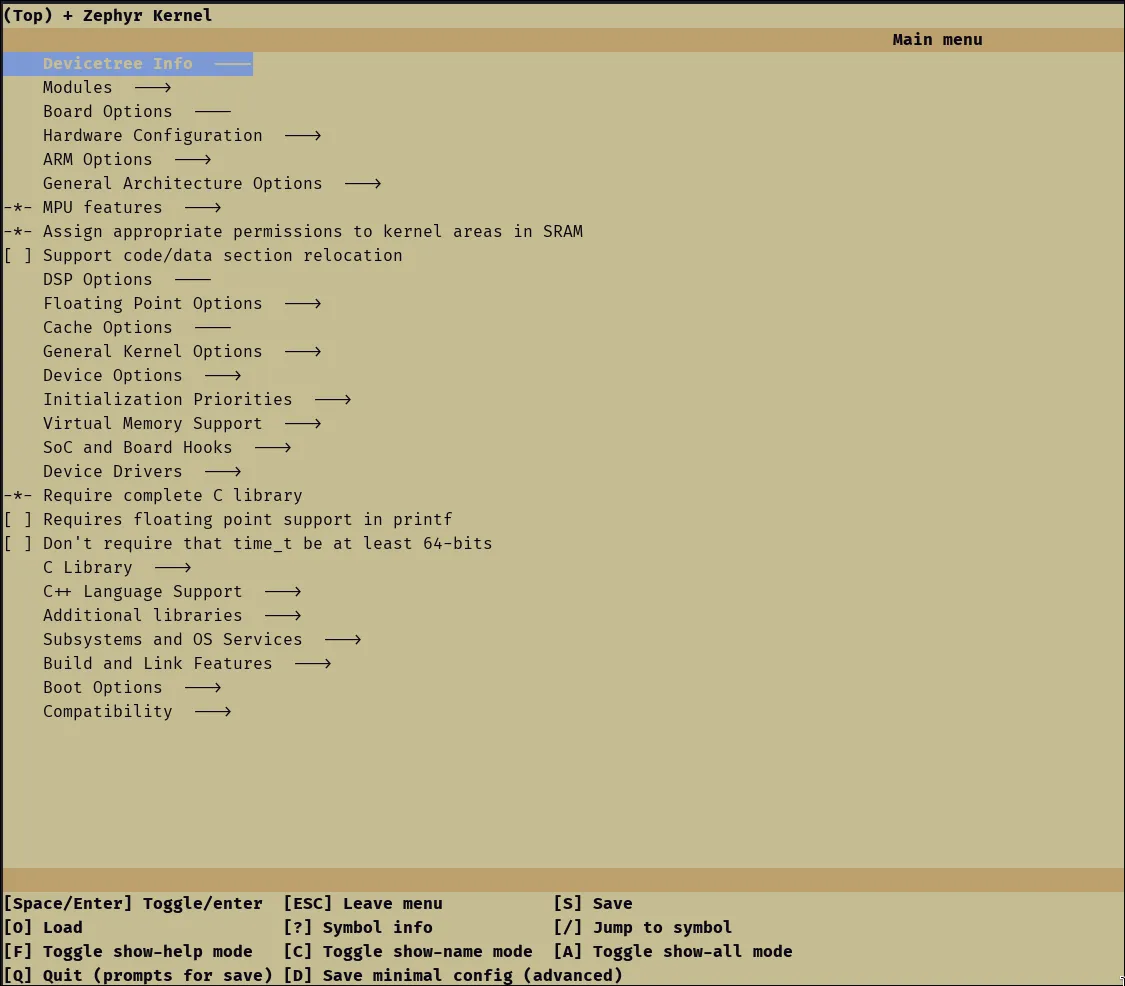
The basics are this:
- Find and select with Enter after that you can toggle/change the symbol value OR you can hit ”?” to find out more about the symbol and look at:
- Help text
- Dependencies that have selected or have prevented the symbol from being available
- Any of the symbols that it is selecting or has dependencies on
- Hit “S” to save and quit out the app.
You should be good to go for another round of building after that. If you have seen a lot of the guides and tutorials around Zephyr you might be tempted to do a:
❯ west build -b <BOARD> -pBut don’t! That will reset the configuration back to what it was before you did the changes in menuconfig. You can remove the -p flag to prevent this. However, an even safer way to make sure that your app will get built with the recently changed config is to use another build target command:
❯ west build --pristine=never -t allThat should build your project without clearing the CMakeCache.txt which can be thought of as the database that holds the configuration of the image among other things. Adding the —pristine=never flag can be a bit verbose and it’s not needed as long as your west config is set up so the default pristine level is not always. To change it do:
❯ west config build.pristine auto
# OR
❯ west config build.pristine never
The never option can be tricky to use and give you sometimes unexpected results (stuck Kconfig symbols, CMakeCache variables not updating, etc), so better go with auto.
After that you should be good to go for a quicker iteration loop of changing the configuration, building, and then flashing.
Don’t forget to also to inspect the .config generated by menuconfig if you want to lock-in some of the configs you changed by adding them to the prj.conf!
That’s just the tip of the iceberg
Aside from menuconfig and all there’s way more build targets that you can use. To get a list of the build targets available use the usage build target.
❯ west build -t usage
...
Cleaning targets:
  clean     - Remove most generated files but keep configuration and backup files
  pristine  - Remove all files in the build directory

Kconfig targets:
  menuconfig - Update .config using a console-based interface
  guiconfig  - Update .config using a graphical interface

Other generic targets:
  all          - Build a zephyr application
  run          - Build a zephyr application and run it if the board supports emulation
  flash        - Run "west flash"
  debug        - Run "west debug"
  debugserver  - Run "west debugserver" (or start GDB server on port 1234 for QEMU targets)
  attach       - Run "west attach"
  pahole       - Report struct padding (requires the pahole program)
  puncover     - Local web server to view RAM, ROM and stack usage (requires puncover pip module)
  ram_report   - Build and create RAM usage report
  rom_report   - Build and create ROM usage report
  footprint    - Create JSON RAM/ROM usage report in the build directory
  initlevels   - Display the initialization sequence
  boards       - Display supported boards
  shields      - Display supported shields
  usage        - Display this text
  llext-edk    - Build the Linkable Loadable Extension (LLEXT) Extension Development Kit (EDK)
  help         - Display all build system targets

Build flags:

  ninja -v [targets] verbose build
  cmake -DW=n   Enable extra gcc checks, n=1,2,3 where
   1: warnings which may be relevant and do not occur too often
   2: warnings which occur quite often but may still be relevant
   3: more obscure warnings, can most likely be ignored
   Multiple levels can be combined with W=12 or W=123
And that’s not all of them as the usage text doesn’t fetch the targets from the build but is hard-coded with values. To get the real list try the help target (you will need to filter out the non-user-facing targets).
I’ll leave you with a list of some of my favorite build targets to use for everyday use or that I’ve found extremely helpful in some situations:
snippets(just get a list of available snippets)initlevelsfootprint(there’s alsoram_reportandrom_report.footprintis the two combined)puncover
That covers the available out-of-the-box targets but you can add custom targets yourself! I might cover the topic in another article as sometimes it is much more convenient than adding a custom west command but that will be all for now.